Why your burned CD has gaps between tracks
The four usual causes, and how to fix each
You burned a live album or a mix, and every track change now has a pause that wasn't in the original. There are four usual causes. The first two are down to how the disc was burned, and are the most common.
1. The disc was burned track-at-once
Track-at-once writes each track separately, and the drive has to leave a gap, traditionally two seconds, between them. It is the default in a lot of burning software.
How to tell: every track change has roughly the same pause, around two seconds.
Fix: burn disc-at-once, which writes the whole disc in one pass and lets gaps be zero. Pregap always burns disc-at-once, and says so in the disc layout bar.

2. The gap setting wasn't zero
Even when burning disc-at-once, most burning software adds a two-second gap between tracks unless you change it, because that is the traditional spacing for albums whose tracks are separate songs.
How to tell: the same evenly sized pause at every change, even though the software says it burns disc-at-once.
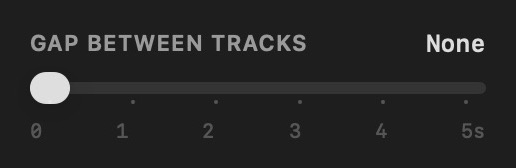
Fix: set the gap between tracks to zero before burning. In Pregap that is the Gap Between Tracks slider, which starts at None.
3. The files carry their own silence
MP3 and AAC encoders add a little padding to the start and end of every file. Well-made files record exactly how much, so it can be trimmed away. Files from older or careless encoders don't, and the padding comes through as a short click or pause. Separately, some downloads and rips have real silence at the start or end of each track.
How to tell: a very short gap or click, often not the same length at every change, even on a disc burned with zero gaps.
Fix: burn from lossless files (FLAC, ALAC, WAV or AIFF) cut from a continuous source. If the files themselves have silence at the ends, trim it in an audio editor first.
4. The player pauses at track changes
Some players stop briefly at every track change, however the disc was burned. This is common in computer drives, older car stereos and some portable players.
How to tell: the same disc plays straight through on another player, such as a hi-fi CD player or a CDJ.
Fix: nothing on the disc will help, because the disc is already right. If it only happens in one car, check its settings for a gapless or continuous-play option.
Burning it right the first time
In short: lossless files, disc-at-once, zero gaps. The gapless CD guide covers the steps.